What is NCHU DNS IP?
Q:What is NCHU DNS IP?
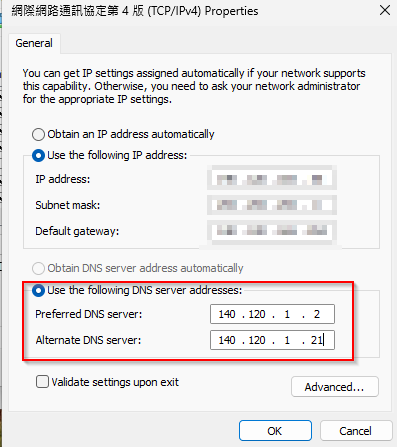
A:Our campus DNS Server IP is 140.120.1.2 and 140.120.1.21.
Please set the DNS configuration on the computer network interface. Include both sets of IP addresses above.
Q:How to set DNS on personal computer?
Taking Windows 11 as an example (Windows 10 is also the same)
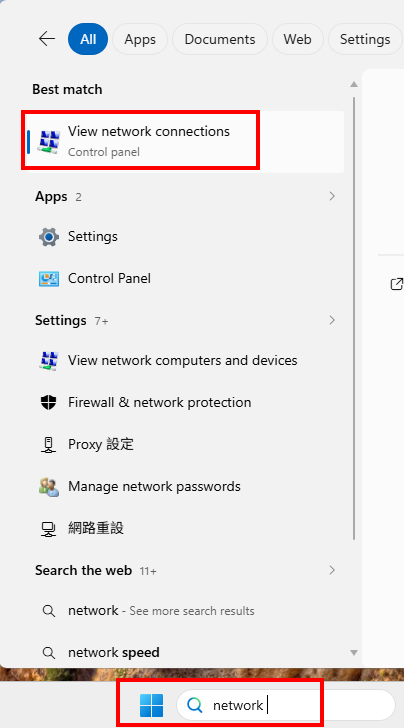
1. Search for 'View network connections' in the computer toolbar and then click on it."
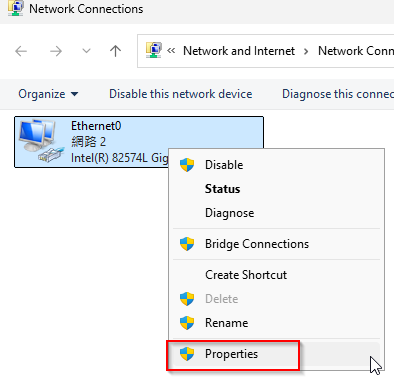
2. Select the Ethernet network, right-click and select "Properties":
3. Select "網際網路通訊協定第4版(TCP/IPv4)" and click "Properties":
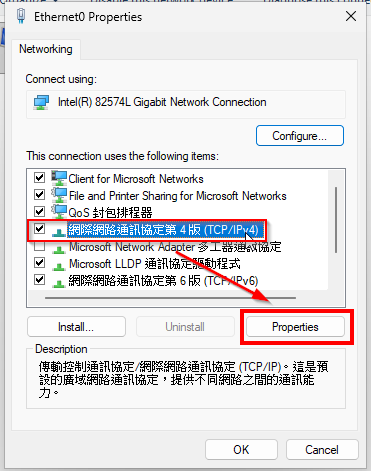
4. Enter the DNS server address: 140.120.1.2 and 140.120.1.21 , and click OK to save :
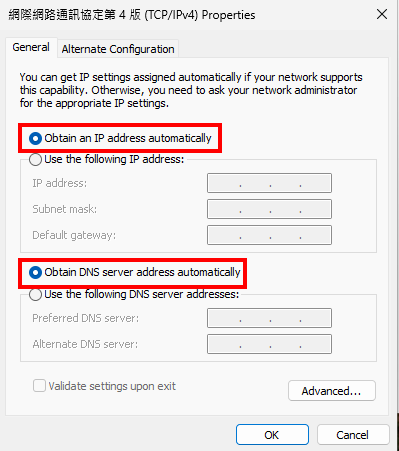
Note: If your IP address is automatically assigned via IPMS, all settings are retrieved automatically, including the University's DNS. Please do not alter these settings arbitrarily.